


A high-performance rack-mountable 4K60 4:4:4 presentation system with matrix switching and out-of-the-box functionality. Provides six HDMI® and two DM® Essentials inputs, two pairs of mirrored HDMI and DM Essentials outputs with 4K60 scalers, and analog audio inputs and outputs. Includes support of HDR (High Dynamic Range) and Dolby Vision® video formats, audio mixing, advanced EDID management, XiO Cloud® connectivity, and enterprise-grade security.
Overview
The HD‑PS622 provides a 4K60 4:4:4 AV presentation system with enhanced HDMI® video switching and audio presentation capabilities for areas such as conference rooms and classrooms. The HD‑PS622 includes six HDMI® inputs, two DM® Essentials inputs, and two HDMI outputs with mirrored DM Essentials outputs.
4K60 4:4:4 and HDR Support
The HDMI ports support video resolutions up to 4K60 with 4:4:4 color sampling. HDR10, HDR10+, and Dolby Vision® video formats are also supported.1
The DM Essentials ports support a maximum resolution of 4K60 4:4:4 up to 130 ft (40 m) and 1080p60 4:4:4 up to 230 ft (70 m).2
Out-of-the-Box Functionality
Features such as automatic switching of inputs, automatic display control, and direct integration with occupancy sensors enable simple setup for many applications without the need for control system programming.
Enterprise-Grade Security
The HD‑PS622 includes advanced security features and protocols. Using 802.1X authentication, Active Directory® credential management, PKI authentication, TLS, SSH, and HTTPS, the HD‑PS622 provides a true enterprise-grade AV switcher.
Automatic Switching of Inputs
Automatic switching among the DM Essentials and HDMI inputs can occur based on the last connected input or on the routing priority assigned to each input. Switching behavior is configurable using the web interface and is also programmable using a Crestron control system. In addition, input and output selection push buttons on the front panel of the HD‑PS622 enable the desired inputs and outputs to be selected manually.
HDBaseT® Certification of DM Essentials Outputs
The DM Essentials outputs are designed using HDBaseT Alliance specifications, ensuring interoperability with other HDBaseT certified devices. The DM Essentials outputs can be connected directly to HDBaseT devices.
4K60 4:4:4 Video Scaler
Each mirrored HDMI and DM Essentials output shares a single 4K60 4:4:4 video scaler. By default, input resolutions are automatically scaled to match the native resolution of the display device, resulting in optimal image quality. For each mirrored output, the video scaler can be enabled or disabled using the web interface or a control system.
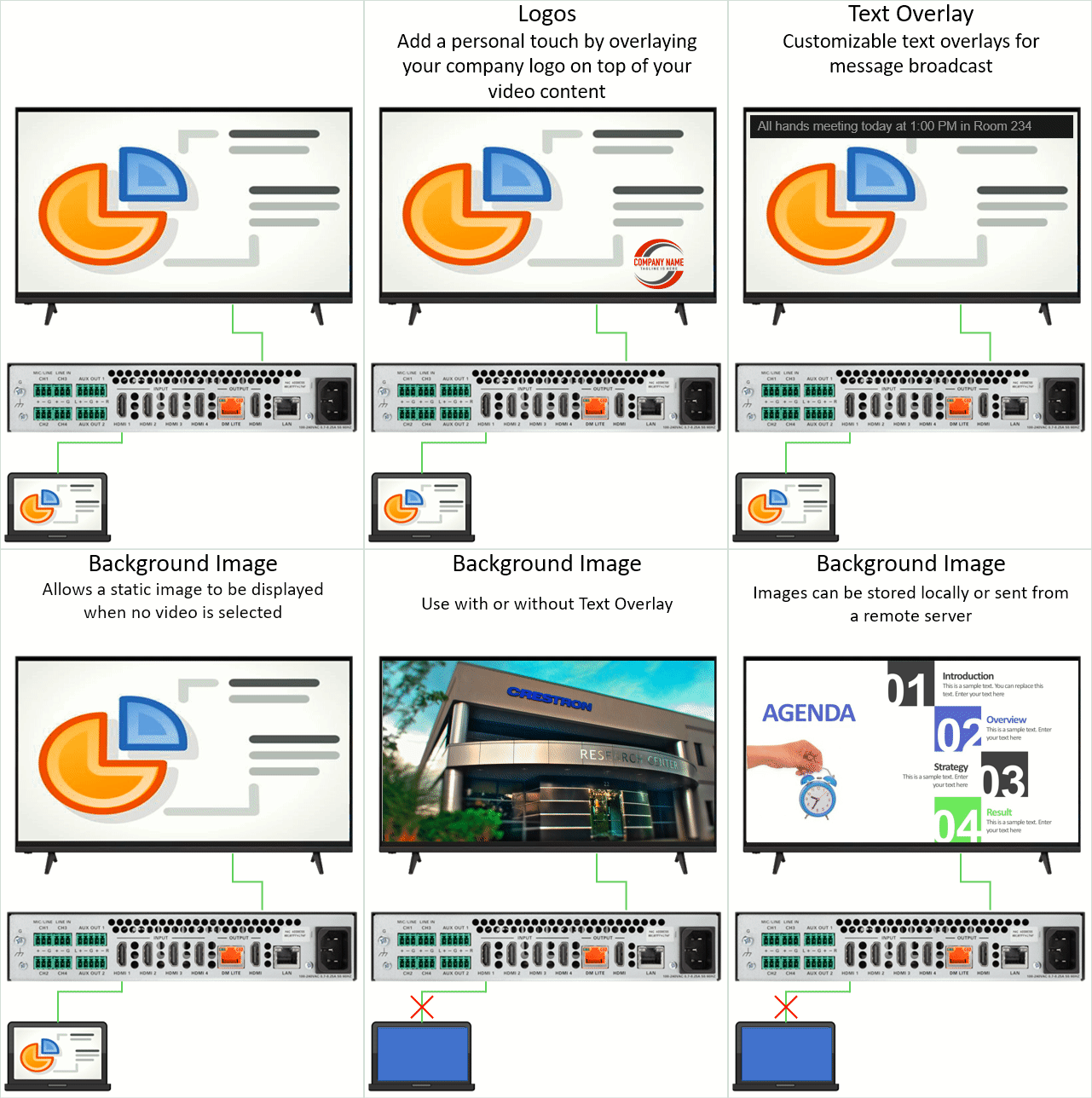
Text Overlay, Image Overlay, and Background Image
When the video scaler is enabled, text overlay, image overlay, and a background image can be displayed on-screen if desired. Text overlay can be used to display dynamic or fixed text for purposes such as labeling the video source or displaying special instructions, schedules, announcements, alerts, or other messaging. An image such as a logo or photo can be uploaded and then used for image overlay on top of active video content. An image can also be uploaded and then used as a background image whenever active video content is not being displayed.
EDID Management
The HD‑PS622 provides comprehensive management of EDID (Extended Display Identification Data) to ensure that every source is displayed at the optimal resolution and format. For applications requiring a custom configuration, the HD‑PS622 enables assessment of the format and resolution capabilities of any device that is connected to an HDMI output of the HD‑PS622. The HD‑PS622 provides the ability to configure signals appropriately for the most desirable and predictable behavior.
Audio Mixing with Audio Embedding and De-embedding
The HD‑PS622 provides four independent audio mixers for four outputs. For each of the two mirrored HDMI and DM Essentials outputs, the HD‑PS622 provides a 9-channel audio mixer. Embedded HDMI LPCM stereo audio can be extracted from the selected HDMI or DM Essentials input and combined with the eight mono analog audio inputs (MIC/LINE CH1-CH2 and LINE INPUT CH3-CH8). Gain and mute sound adjustments can be made to each of the nine inputs being mixed.
For each of the two AUX outputs, the HD‑PS622 provides a 10-channel audio mixer. Embedded HDMI LPCM stereo audio can be extracted from the selected HDMI or DM Essentials input for each of the two mirrored HDMI and DM Essentials outputs and combined with the eight mono analog audio inputs (MIC/LINE CH1-CH2 and LINE INPUT CH3-CH8). Gain and mute sound adjustments can be made to each of the 10 inputs being mixed.
Volume and mute control are configurable for each mirrored HDMI and DM Essentials output and AUX audio output independently.
USB Power Port
A USB power port is included on the HD‑PS622 to power USB powered devices (500mA maximum).
NOTE: No USB data is passed through the USB power port. The port cannot be used to extend USB data, video, or audio signals.
Device Control via CEC, IR, or RS-232
CEC (Consumer Electronics Control) over the HDMI outputs can enable display devices to be turned on or off automatically without the use of a control system. Under the management of a control system, CEC over the HDMI inputs can control source devices.
When connected to compatible DM Essentials receivers (HD-RX-101-C-E, HD-RX-101-C-1G-E, HD-RXC-101-C-E, and HD-RXC-101-C-1G-E), the DM Essentials output ports can control display devices without the use of a control system. The DM Essentials output ports can output CEC display control when connected to HD-RX-101-C-E or HD-RX-101-C-1G-E receivers. When connected to HD-RXC-101-C-E or HD-RXC-101-C-1G-E receivers, the DM Essentials output ports can output CEC, IR, or RS‑232 display control. Under the management of a control system, the DM Essentials output ports can output CEC and RS‑232 control to HDBaseT devices.
The HD‑PS622 also includes support for Crestron Certified Drivers. CEC and IP drivers can be used for the HDMI and DM Essentials output ports to provide automatic display control without the use of a control system.
Built-In Web Interface
Configuration of the HD‑PS622 can be accomplished by using the built-in web interface. The configuration of a single device can be downloaded to a computer or mobile device and then uploaded to multiple HD‑PS622 units to simplify system installation.
1 RU Rack-Mountable Design
The HD‑PS622 can be mounted into a 19-inch EIA equipment rack using the included rack mount brackets. The device occupies 1 RU of rack space.





Features
Key Features
- 4K60 4:4:4 digital AV presentation system
- HDR10, HDR10+, and Dolby Vision® video formats
- Six HDMI® and two DM® Essentials inputs with automatic switching
- Two HDMI outputs mirrored with DM Essentials outputs
- HDBaseT® certification of DM Essentials outputs
- 4K60 4:4:4 video scaler for each mirrored output
- Out-of-the-box functionality
- Enterprise-grade security
- Text overlay, image overlay, and background image for on‑screen display
- EDID management
- HDCP 2.3 compliance
- Audio mixing with audio embedding and de-embedding
- 100BASE-TX/1000BASE-T Ethernet connectivity
- USB power port
- Device control via CEC, IR, or RS-232 when used with compatible DM Essentials receivers
- Built-in web interface
- Compatibility with Crestron® 3-Series® or later control systems
- .AV Framework™ technology support
- XiO Cloud® service support
- API (application programming interface)
- 1 RU rack-mountable design
Specifications
| Video | |||||||||||||||||||||||||||||||||
| Switcher | 8x2 auto-switching or manual, audio-follows-video, Crestron Auto-Locking® and QuickSwitch HD™ technologies | ||||||||||||||||||||||||||||||||
| Scaler (mirrored HDMI and DM Essentials outputs) | 4K60 4:4:4 video scaler with motion-adaptive deinterlacing, intelligent frame rate conversion; Deep Color support; HDR10, HDR10+, and Dolby Vision support; content-adaptive noise reduction; and 3:2/2:2 pull-down detection and recovery | ||||||||||||||||||||||||||||||||
| Input Signal Types | HDMI with HDR10, HDR10+, and Dolby Vision support, Deep Color support, and 4K60 4:4:4 support (DVI and Dual-Mode DisplayPort™ interface compatible3) on Inputs 1-6, DM Essentials with Deep Color and 4K on Inputs 7-8 | ||||||||||||||||||||||||||||||||
| Output Signal Types | HDMI, DM Essentials, and HDBaseT with HDR10, HDR10+, and Dolby Vision pass-through support, Deep Color support, and 4K60 4:4:4 support (DVI compatible4) | ||||||||||||||||||||||||||||||||
| Copy Protection | HDCP 2.3 | ||||||||||||||||||||||||||||||||
| Maximum Resolutions Common resolutions for the HDMI and DM Essentials inputs are listed in the following table.
|
|||||||||||||||||||||||||||||||||
| Scaler Output Resolutions, HDMI and DM Essentials | |||||||||||||||||||||||||||||||||
| Auto-HDMI Auto-DM Lite 1280x720p@50Hz (720p50) 1280x720p@60Hz (720p60) 1920x1080p@24Hz (1080p24) 1920x1080p@25Hz (1080p25) 1920x1080p@30Hz (1080p30) 1920x1080p@50Hz (1080p50) 1920x1080p@60Hz (1080p60) 3840x2160p@24Hz 3840x2160p@25Hz 3840x2160p@30Hz 3840x2160p@50Hz 3840x2160p@60Hz 4096x2160p@24Hz 4096x2160p@25Hz 4096x2160p@30Hz 4096x2160p@50Hz 4096x2160p@60Hz |
|||||||||||||||||||||||||||||||||
| Audio, General | |||||||||||||||||||||||||||||||||
| Audio Inputs |
Two mono 1-channel MIC/LINE inputs |
||||||||||||||||||||||||||||||||
| Audio Outputs |
One mirrored HDMI 1 and DM Essentials 1 audio output |
||||||||||||||||||||||||||||||||
| Analog-to-Digital Conversion | 24-bit 48 kHz | ||||||||||||||||||||||||||||||||
| Digital-to-Analog Conversion | 24-bit 48 kHz | ||||||||||||||||||||||||||||||||
| Audio, Digital Inputs (HDMI 1-6 and DM 7-8) | |||||||||||||||||||||||||||||||||
| Input Signal Types | HDMI (Dual-Mode DisplayPort interface compatible3), DM Essentials | ||||||||||||||||||||||||||||||||
| Formats | Dolby Digital®, Dolby Digital EX, Dolby Digital Plus, Dolby® TrueHD, Dolby Atmos®, DTS®, DTS-ES, DTS 96/24, DTS HD® High Res, DTS-HD Master Audio, DTS:X®, LPCM up to 8 channels | ||||||||||||||||||||||||||||||||
| Audio, Microphone/Line Inputs (CH1-CH2) | |||||||||||||||||||||||||||||||||
| Input Signal Type | Mono analog | ||||||||||||||||||||||||||||||||
| Gain Range | -10 dB to +10 dB in 1 dB increments | ||||||||||||||||||||||||||||||||
| Phantom Power | +48 VDC, 12 mA, enable or disable per channel | ||||||||||||||||||||||||||||||||
| Mute | Enable or disable per channel | ||||||||||||||||||||||||||||||||
| Audio, Line Inputs (CH3-CH8) | |||||||||||||||||||||||||||||||||
| Input Signal Type | Mono analog | ||||||||||||||||||||||||||||||||
| Gain Range | -10 dB to +10 dB in 1 dB increments | ||||||||||||||||||||||||||||||||
| Balanced Line Input Level | 4 Vrms | ||||||||||||||||||||||||||||||||
|
Unbalanced Line Input Level |
2 Vrms | ||||||||||||||||||||||||||||||||
| Line Input Impedance | >10k ohms | ||||||||||||||||||||||||||||||||
| Audio, Digital Output | |||||||||||||||||||||||||||||||||
| Output Signal Type | HDMI | ||||||||||||||||||||||||||||||||
| Formats | Dolby Digital, Dolby Digital EX, Dolby Digital Plus, Dolby TrueHD, Dolby Atmos, DTS, DTS-ES, DTS 96/24, DTS HD High Res, DTS-HD Master Audio, DTS:X, LPCM up to 8 channels | ||||||||||||||||||||||||||||||||
| Source Gain | -80 dB to +20 dB adjustment range, plus Mute | ||||||||||||||||||||||||||||||||
| Volume Control | -80 dB to +20 dB adjustment range, plus Mute | ||||||||||||||||||||||||||||||||
| Delay | 0 to 150 ms adjustment range | ||||||||||||||||||||||||||||||||
| Audio, Analog Line Output | |||||||||||||||||||||||||||||||||
| Output Signal Type/Format | Stereo 2-channel | ||||||||||||||||||||||||||||||||
| Frequency Response | ±0.5 dB, 20 Hz to 20 kHz | ||||||||||||||||||||||||||||||||
| THD+N | <0.005%, 1 kHz, 4 Vrms | ||||||||||||||||||||||||||||||||
| S/N Ratio | >95 dB, 4 Vrms, 20 Hz to 20 KHz, A‑weighted | ||||||||||||||||||||||||||||||||
| Crosstalk | >90 dB, 1 KHz, for multiple inputs only | ||||||||||||||||||||||||||||||||
| Stereo Separation | >80 dB, 20 Hz to 20 kHz | ||||||||||||||||||||||||||||||||
| Volume Control | -80 dB to +20 dB adjustment range, plus Mute, Mono, and Stereo | ||||||||||||||||||||||||||||||||
| Communications | |||||||||||||||||||||||||||||||||
| Ethernet | 100/1000 Mbps, auto-switching, auto-negotiating, auto-discovery, full/half duplex, DHCP, Web browser setup and control, Crestron control system integration, IEEE 802.1X, Secure CIP, Authentication, SSH/SSL, TLS | ||||||||||||||||||||||||||||||||
| USB | For firmware loading and configuration management and to power a USB powered device | ||||||||||||||||||||||||||||||||
| HDMI | HDCP 2.3, EDID, CEC | ||||||||||||||||||||||||||||||||
| DM Essentials | HDCP 2.3 and EDID | ||||||||||||||||||||||||||||||||
| HDBaseT | HDCP 2.3 | ||||||||||||||||||||||||||||||||
| Connectors | |||||||||||||||||||||||||||||||||
| MIC/LINE CH1-CH2 | (2) 3-pin 3.5 mm detachable terminal blocks; Balanced mono microphone/line audio inputs |
||||||||||||||||||||||||||||||||
| LINE INPUT CH3-CH8 | (6) 3-pin 3.5 mm detachable terminal blocks; Balanced mono line-level audio inputs |
||||||||||||||||||||||||||||||||
| AUX OUT 1-2 | (2) 5-pin 3.5 mm detachable terminal blocks; Balanced stereo line-level audio outputs; Output Impedance: <200 Ohms; Maximum Output Level: 4 Vrms balanced |
||||||||||||||||||||||||||||||||
| HDMI INPUTS 1-6 | (6) 19-pin Type A connector, female; HDMI digital video/audio input (DVI and Dual-Mode DisplayPort interface compatible3) |
||||||||||||||||||||||||||||||||
| DM INPUTS 7-8 | (2) 8-pin RJ-45 yellow connectors, female, shielded; DM Essentials input ports for connection to DM Essentials transmitters5 |
||||||||||||||||||||||||||||||||
| DM OUTPUT 1 | (1) 8-pin RJ-45 blue connector, female, shielded; DM Essentials output port (HDBaseT standard compliant) for connection to a DM Essentials receiver, DMPS Essentials switcher, or HDBaseT device6; Mirrored with HDMI OUTPUT 1 |
||||||||||||||||||||||||||||||||
| HDMI OUTPUT 1 | (1) 19-pin Type A connector, female; HDMI digital video/audio output (DVI compatible4); Mirrored with DM OUTPUT 1 |
||||||||||||||||||||||||||||||||
| DM OUTPUT 2 | (1) 8-pin RJ-45 blue connector, female, shielded; DM Essentials output port (HDBaseT standard compliant) for connection to a DM Essentials receiver, DMPS Essentials switcher, or HDBaseT device;6 Mirrored with HDMI OUTPUT 2 |
||||||||||||||||||||||||||||||||
| HDMI OUTPUT 2 |
(1) 19-pin Type A connector, female; |
||||||||||||||||||||||||||||||||
| LAN | (1) 8-pin RJ-45 connector, female; 100BASE-TX/1000BASE-T Ethernet port |
||||||||||||||||||||||||||||||||
| 100-240VAC 1.8-0.7A 50/60 Hz | (1) IEC 60320 C14 mains power inlet; Mates with removable power cord, included |
||||||||||||||||||||||||||||||||
| NOTE: This power connection powers both the HD‑PS622 and the connected DM Essentials transmitters and receivers. When connected to the HD‑PS622, the DM Essentials transmitters and receivers must not be connected to power.7 | |||||||||||||||||||||||||||||||||
| G | (1) 6-32 screw, chassis ground lug | ||||||||||||||||||||||||||||||||
| SERVICE | (1) USB 2.0 Type A connector, female; For firmware loading and configuration management; Can also provide up to 5 V 500 mA power to a USB powered device |
||||||||||||||||||||||||||||||||
| Controls and Indicators | |||||||||||||||||||||||||||||||||
| PWR | (1) LED. Amber indicates that the device is booting. Green indicates that the device is operational. | ||||||||||||||||||||||||||||||||
| AUTO | (1) Push button to enable or disable automatic switching and (1) green LED to indicate that automatic switching is enabled. | ||||||||||||||||||||||||||||||||
| SETUP | (1) Red LED and (1) push button for display of IP address on connected HDMI and DM Essentials outputs | ||||||||||||||||||||||||||||||||
| INPUT 1-8 | (8) Push buttons for manual input selection and (8) LEDs. Green indicates that the corresponding input is routed to an output. Amber indicates that a source is detected at the corresponding input but is not routed to an output. | ||||||||||||||||||||||||||||||||
| OUTPUT 1-2 | (2) Push buttons for manual output selection and (2) LEDs. Green indicates that a display or other destination device is detected and the corresponding output is transmitting video. Amber indicates that a display or other destination device is detected but no video is routed to the corresponding output. | ||||||||||||||||||||||||||||||||
| FOLLOW | (1) Push button to enable or disable Follow Output mode and (1) LED. Green indicates that Follow Output mode is enabled, which causes the selected HDMI or DM Essentials input to be routed to HDMI and DM Essentials outputs 1 and 2 simultaneously. | ||||||||||||||||||||||||||||||||
| Ethernet | (2) LEDs on RJ-45 LAN connector. Link status LED: Green indicates that a 100BASE-TX link is established. Amber indicates that a 1000BASE-T link is established. Ethernet activity LED: Flashing amber indicates Ethernet activity. |
||||||||||||||||||||||||||||||||
| DM Essentials | (2) LEDs on RJ-45 DM Essentials connectors. Green indicates that a DM Essentials link is established. Flashing amber indicates non-HDCP video and solid amber indicates HDCP video. | ||||||||||||||||||||||||||||||||
| Power | |||||||||||||||||||||||||||||||||
| Mains Power | 100-240VAC 1.8-0.7A 50/60 Hz | ||||||||||||||||||||||||||||||||
| NOTE: The AC mains power connection powers both the HD‑PS622 and connected DM Essentials transmitters and receivers. When connected to the HD‑PS622, the DM Essentials transmitters and receivers must not be connected to power.7 | |||||||||||||||||||||||||||||||||
| Power Consumption | 72 W typical | ||||||||||||||||||||||||||||||||
| Environmental | |||||||||||||||||||||||||||||||||
| Temperature | 32° to 104° F (0° to 40° C) | ||||||||||||||||||||||||||||||||
| Humidity | 10% to 90% RH (non‑condensing) | ||||||||||||||||||||||||||||||||
| Heat Dissipation | 164 BTU/hr typical | ||||||||||||||||||||||||||||||||
| Acoustic Noise | 32 dBA typical | ||||||||||||||||||||||||||||||||
| Construction | |||||||||||||||||||||||||||||||||
| Chassis | Metal, black finish, vented sides | ||||||||||||||||||||||||||||||||
| Mounting | 1 RU 19-inch rack-mountable (rack ears included) | ||||||||||||||||||||||||||||||||
| Dimensions | |||||||||||||||||||||||||||||||||
| Height | 1.72 in. (44 mm) | ||||||||||||||||||||||||||||||||
| Width | 17.33 in. (441 mm) without rack ears 19.00 in. (483 mm) with rack ears (included) |
||||||||||||||||||||||||||||||||
| Depth | 10.82 in. (275 mm) | ||||||||||||||||||||||||||||||||
| Weight | |||||||||||||||||||||||||||||||||
| 8.0 lb (3.63 kg) | |||||||||||||||||||||||||||||||||
| Compliance | |||||||||||||||||||||||||||||||||
| Regulatory Model | M202004002 | ||||||||||||||||||||||||||||||||
| Bureau Veritas Listed for US & Canada, IC, CE, FCC Part 15 Class B digital device | |||||||||||||||||||||||||||||||||
| Maximum DM Essentials Transmission Distance | |||||||||||||||||||||||||||||||||
|
|||||||||||||||||||||||||||||||||

- Our primary carrier of choice is UPS, however, occasionally orders are shipped via FedEx and USPS.
- All in-stock orders will be shipped Standard Ground with a 3-5 business day delivery time frame.
- Dropship orders may require longer processing times with our manufacturers.
- Deputy Electronics will not ship to PO boxes. A representative will contact you should you enter an unacceptable shipping address. Your order will not be processed until an updated shipping address is provided. If no address is provided within 30 days of the order date, your order will be canceled.
- All orders shipping within the 48 contiguous states will be charged a standard $9.99 shipping and handling fee.
- Should you need your order expedited, please contact a customer service representative at (812) 522-8070 Monday – Friday from 8:00 am to 5:00 pm for pricing/rate quotes. Please be advised that not all items will qualify for expedited shipping.
- Orders placed on Friday after business hours, Saturday, Sunday, or Holidays will not qualify for special shipping methods such as Next Day Air, Overnight Shipping, Second Day Air, or 3 Day Select.
- Expedited orders are only able to ship on business days.
